Docs
A public X post, or one you fabricate and override, drawn as a PNG.
Install
- npm
npm i -g xpostplate - Homebrew
brew install jspeaks/xpostplate/xpostplate - pnpm
pnpm add -g xpostplate - Bun
bun add -g xpostplate - npx
npx xpostplate --help - Source
git clone https://github.com/jspeaks/xpostplate && cd xpostplate && npm install && npm link
Then run xpostplate --help. npx runs it once without a global install. Homebrew installs the latest tagged release; add --HEAD for bleeding edge from main (brew install --HEAD jspeaks/xpostplate/xpostplate).
Views
--view detailopened post as x.com shows it (default): avatar, check, photos, time · date · views--view timelinehome-feed row with relative time--view quotenested post, inset, no action bar--view platebordered broadcast card (near-black border, X mark, initials)
No flags means the faithful opened post: light theme, no border, no X mark, real avatar (initials as fallback), verified check from the post data, blue @mentions and links, photos drawn, and counts only when the source has them. The old primitive plate is --view plate --no-media; add --accent '#1D9BF0' for its old blue border.
One real post (SpaceX, Starlink V3) in each view, rendered by the CLI:
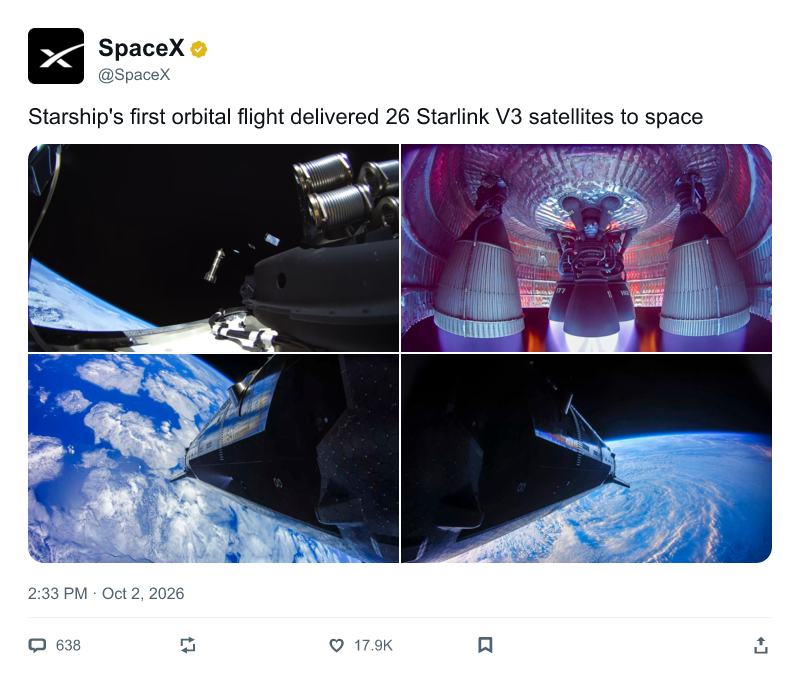
--view detail (default): the opened post.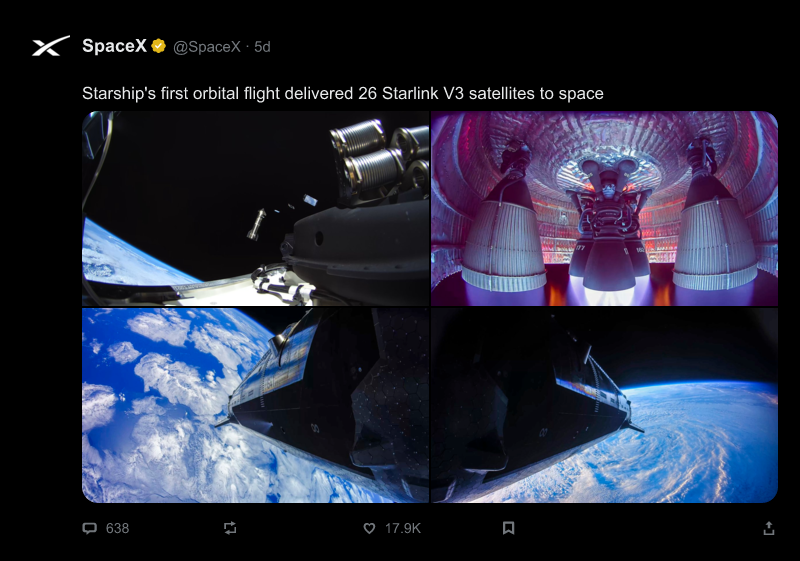
--view timeline --theme dark: the home-feed row, x.com Lights out.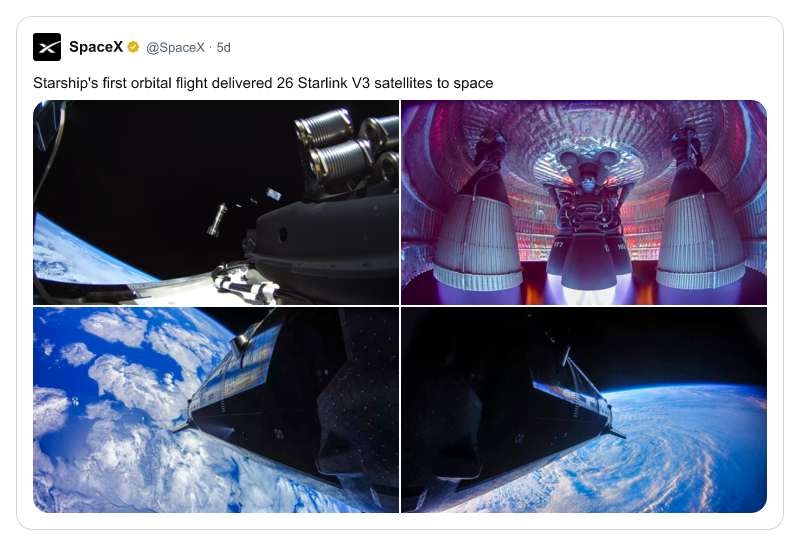
--view quote: the nested post, no action bar.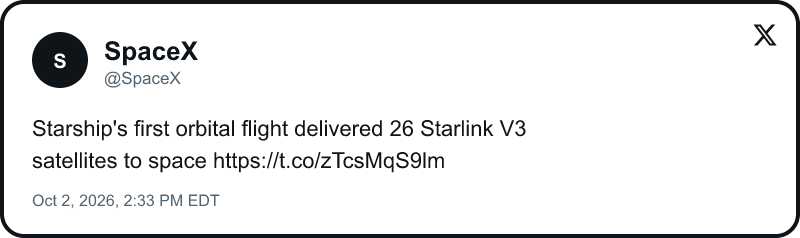
--view plate --no-media: a plate is the bordered broadcast card. Border, initials, X mark, text only.Emoji
Emoji draw in color in every view and theme, including --fabricate --text: ZWJ families, skin tones, flags, keycaps, and plain emoji. The graphics are the Twemoji set (v17.0.3, CC-BY 4.0), bundled in the package, so a render needs no emoji font and no network. Line wrapping counts each emoji at the width x.com draws it. Symbols your text font already has, like © and ™, stay text.

xpostplate https://x.com/Starlink/status/2094882783915295062 --max-height 300
Width and scale
Width = layout, scale = pixel density. --width sets how wide the post is laid out (200–4096 px, default 800). Text keeps its size, so a wider layout means longer lines and a shorter card. --scale keeps that layout and multiplies the pixels (0.5–8, decimals allowed, default 1): --width 600 --scale 3 looks exactly like --width 600, as a PNG 1800 px wide. --width 1800 would instead lay out longer lines of the same-size text.
Scale is not an upscaled bitmap. The post is a vector render, so text, icons, the check, and emoji are rasterized at the final size and stay crisp for print, 4K video, and retina screens. Photos are resampled once, from the largest size X serves that covers the output (up to 4096 px); the avatar comes from X’s largest profile size (400×400, smaller for some accounts), so at high scales it is the one element that can be upscaled. --max-height counts layout pixels, before scale. Each side is capped at 16384 px, with a clear error past that, and --scale 1 gives the same bytes as leaving it off.
xpostplate https://x.com/SpaceX/status/[slug] --width 600 --scale 3 -o post@3x.png
Flags
--fabricateinvent a post from--text; no URL, no network--name--handle--textoverride identity and body--verified--no-verifiedshow or hide the check--postedoverride the timestamp (ISO)--replies--reposts--quotes--likes--bookmarks--viewscount overrides (zero counts as real)--media--no-mediaphotos under the text (default on);--no-mediais text only and keeps the media link--theme light|darkdefault light; dark is x.com Lights out (true black)--mark--no-markX mark; on for plate, off for the other views--border--accent--radiusplate frame; accent defaults to near-black--widthlayout width in px (default 800); text keeps its size and reflows--scalepixel density (default 1): same layout, n× the pixels, drawn from vectors (width vs scale)--max-heightdrop photos before body lines; layout px, before scale-owrite PNG to a file; omit on a TTY for{handle}-{YYYYMMDD-HHMMSS}.png(x-…if fabricate/missing handle);-= stdout--jsonprint the post JSON, skip the image--fixturerender local JSON instead of fetching
Leave X_BEARER_TOKEN unset and a public post still loads from X's syndication feed. Counts that feed does not carry stay off the image. xpostplate --help lists every flag.
Examples
- The opened post as x.com shows it, photos included. No token.
xpostplate https://x.com/SpaceX/status/[slug] > post.png- Home-feed row, dark.
xpostplate https://x.com/SpaceX/status/[slug] --view timeline --theme dark -o timeline.png- The old broadcast plate: border, X mark, text only.
xpostplate https://x.com/SpaceX/status/[slug] --view plate --no-media -o plate.png- Quote only.
xpostplate https://x.com/SpaceX/status/[slug] --view quote -o quote.png- Same layout as
--width 600, three times the pixels: print, 4K video, retina. xpostplate https://x.com/SpaceX/status/[slug] --width 600 --scale 3 -o post@3x.png- Invent a post. No URL and no network.
xpostplate --fabricate --name "SpaceX" --handle SpaceX --text "Starship is stacked." --view timeline- Emoji in color, offline: a family, a skin tone, a flag, a keycap.
xpostplate --fabricate --name "Jaye" --handle jspeaks --text "Shipped 🚀 👨👩👧👦 👋🏽 🇺🇸 1️⃣"- Start from a public post and replace the words.
xpostplate https://x.com/SpaceX/status/[slug] --text "A line written for the image."
Post JSON
--json prints this shaped post. --fixture accepts the same flat shape, or the X API envelope (data + includes.users) like fixtures/sample-post.json. Counts may be numbers or null (hidden). --fabricate builds the same fields from flags.
{
  "id": "1000000000000000001",
  "text": "Body text.",
  "created_at": "2026-10-02T18:30:00.000Z",
  "public_metrics": {
    "reply_count": 3,
    "retweet_count": 12,
    "quote_count": 1,
    "like_count": 48,
    "bookmark_count": 5,
    "impression_count": 1200
  },
  "author": {
    "id": "9001",
    "name": "Sample Author",
    "username": "sample_author",
    "profile_image_url": "https://example.invalid/avatar.png",
    "verified": false
  },
  "photos": ["https://example.invalid/photo.jpg"]
}
How it renders
Each post is built as an SVG in-process (lib/svg.js). Text is measured with the same TrueType files that draw it, emoji are inlined from the bundled Twemoji set, and the X mark comes from a bundled SVG. @resvg/resvg-js rasterizes the SVG to PNG with system font lookup off; sharp crops, rounds, and composites photos and the avatar. No headless browser, no screenshot, no ImageMagick. The only network calls fetch the post, its photos, and its avatar; --fixture and --fabricate make none. The CLI writes PNG; the SVG stays internal. --scale zooms that same SVG at rasterization, so more pixels never means a blurrier image.
Deterministic. The same input renders the same PNG, byte for byte: the same fixture, flags, and machine give identical files every run, and a live post renders identically until its data changes (a new like count, a new avatar). Times print in New York time whatever the machine's time zone. For an agent, a post image is one shell command, not tokens spent generating, describing, or screenshotting a picture.
What can change the bytes: --view timeline and --view quote show relative time (13h) until a post is a week old; --fabricate without --posted stamps the current time; and text uses Arial on macOS or DejaVu Sans or Liberation Sans on Linux, so the same input can differ across systems.
Requirements
Node 20.9 or newer. Nothing else: no ImageMagick. Rendering uses npm packages that ship prebuilt binaries (@resvg/resvg-js for the SVG, sharp for photos and the avatar), so npm, pnpm, Bun, and Homebrew installs need no system packages. Homebrew pulls in Node for you. Color emoji come from the bundled Twemoji graphics (about 0.95 MB, compressed), not from a system font.
Emoji graphics: Twemoji, Copyright 2014–2021 Twitter, Inc and other contributors, and 2022–present Jason Sofonia & Justine De Caires and other contributors, licensed under CC-BY 4.0. The code is MIT.